
Blog
What Is KNX: The Standard That Turns an Ordinary Home Into a Smart One

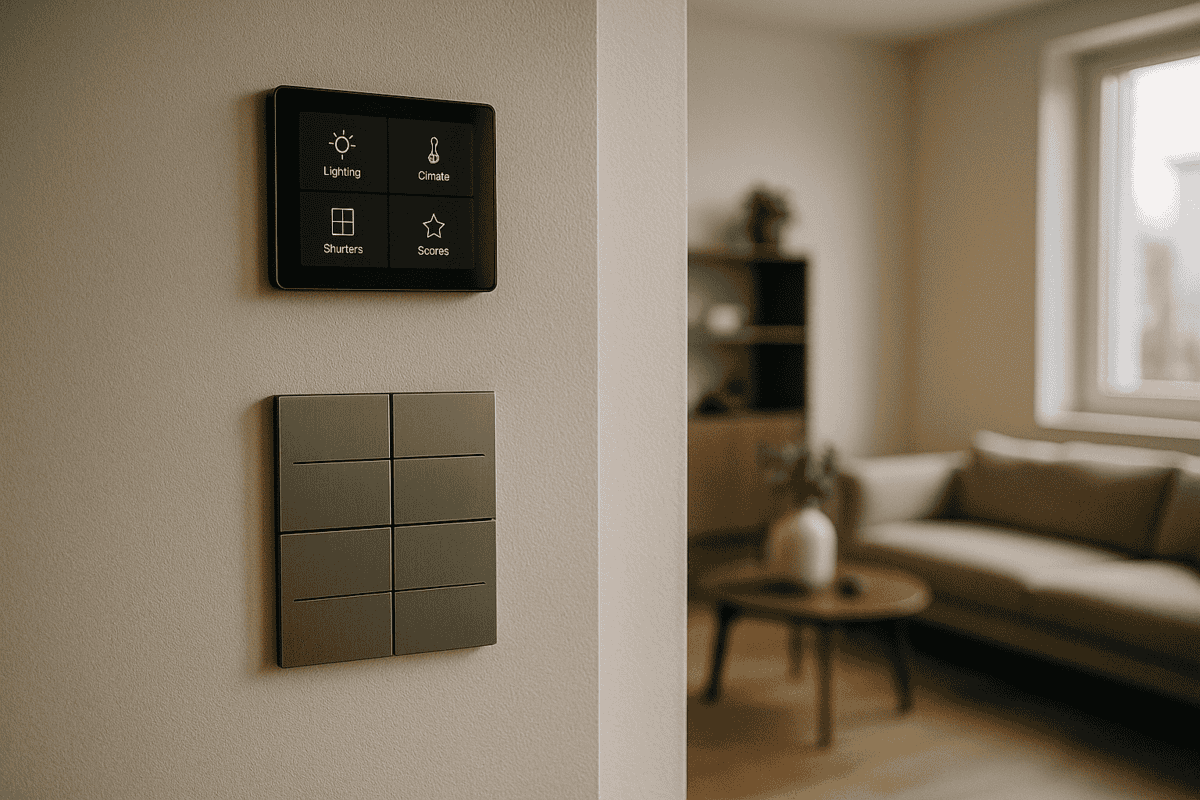
What is KNX, and why are more and more homeowners, architects and contractors choosing it for building automation? The short answer: think of it as a conventional electrical installation, except every device communicates with every other device over a dedicated cable. Simple in principle, powerful in practice.
What KNX Is and How It Actually Works
KNX is the international standard ISO 14543 for building and home automation, implemented in more than 190 countries by over 500 certified manufacturers. Picture it as a communication network for your building — in the same way a phone, laptop and TV share a Wi-Fi network, all KNX devices (switches, sensors, actuators) share the KNX bus, a dedicated two-wire cable that carries commands and data. One common language; every device understands it.
The key difference from a conventional installation is the wiring architecture. Instead of running a separate power cable from every switch to every light fitting, you have two distinct cable types:
- 230 V power cable — supplies the lights and loads, exactly as in a standard installation.
- KNX bus cable (24 V) — carries commands between push-buttons, sensors and actuators.
A KNX actuator is the device that executes commands: it receives a message on the bus (“switch on bedroom light”) and operates the relay that feeds the fitting. One increasingly popular approach is to mount the KNX relay directly inside the wall switch rather than in the distribution board — the result is a cleaner installation, less cabling overall, and faster fault-finding. Details like this matter when you are weighing up what KNX means for a specific project.
For a deeper technical look, the KNX Association publishes comprehensive documentation on the ISO 14543-3 protocol, covering KNX/TP (twisted pair), KNX/RF (radio frequency) and KNX/IP for integration with existing IP networks.
What Changes — and What Stays the Same — When You Choose KNX
One of the most common surprises for new clients: a KNX installation keeps working even when the internet goes down. The bus is a physical, dedicated network that operates entirely autonomously. Wi-Fi is optional — useful for remote app control, but never a dependency for core functions.
What you gain with KNX:
- Centralised control: lighting, blinds and climate from a single app or touch panel.
- Scene automation: one “leaving home” button press turns off all lights and lowers every blind simultaneously.
- Energy savings: intelligent automation typically delivers 15–20% reductions in electricity bills.
- Open ecosystem: 500+ certified manufacturers — you are never locked into a single supplier.
- Longevity: KNX systems routinely run 15–20 years without major issues, and the standard maintains full backward compatibility across its 30+ year history.
What you avoid with KNX:
- Internet dependency: local automations (motion sensor triggers light, thermostat holds temperature) function without any external connection.
- Full rewiring in retrofits: KNX can be added to existing buildings using KNX/RF or hybrid approaches.
- Ongoing software costs: no monthly subscriptions or licence fees for the building owner.
- Vendor lock-in: the standard guarantees interoperability across all certified products.
To put this in context: a three-bedroom apartment fitted with KNX can control 15 lighting circuits, 8 motorised blinds and climate across 4 zones — all from a smartphone or wall panel. In a 200 m² villa, a KNX system managing 45 lighting circuits, underfloor heating across 6 zones, 16 blinds and the alarm system has delivered energy savings of around 22% in the first year compared with the previous conventional setup. Property valuations also tend to benefit, with smart-home premiums commonly cited in the 8–12% range.
Wondering how KNX compares with proprietary platforms? Our KNX vs Tuya vs Loxone comparison covers the practical differences in detail.
KNX for Professionals: What Each Role Needs to Know
Architects: KNX integrates into any project without compromising design. KNX push-buttons are visually identical to conventional switches, and touch panels can be specified in finishes to match any interior scheme. The bus cable (a standard 2×2×0.8 mm twisted-pair, typically green-sheathed) runs alongside the power installation.
Electrical contractors: physical installation requires no special KNX certification. The cabling process is similar to a conventional fit-out — you simply add the bus cable. ETS6 programming can be handled by a specialist or learned in-house; foundation courses typically take three to five days.
Design engineers: KNX topology can be linear, tree or star. Each line supports up to 64 devices, with expansion via line couplers. Bus supply voltage is 30 V DC; individual device current draw is typically 2–10 mA.
Project managers: KNX installation takes roughly 15–20% longer than a conventional fit-out, but commissioning is fast — a 150 m² house can typically be programmed and handed over in one to two days. Indicative installed costs across European projects range from approximately €50 to €120 per usable square metre, depending on scope and specification. For a structured overview of what drives costs, see our KNX design and ETS programming service page.
How Reliable Is KNX — and What Happens If Something Goes Wrong?
KNX systems have a failure rate below 2% per year, and the vast majority of issues are configuration-related rather than hardware failures. When a single device does develop a fault, the rest of the system continues to operate normally — there is no single point of failure as with centralised architectures.
Diagnosis is straightforward using ETS6, and replacement parts are available from any KNX distributor. Preventive maintenance plans typically include annual check-ups and software reviews, keeping the system running smoothly over its full lifespan.
Will I Be Stuck With One Supplier If I Choose KNX?
No — this is one of KNX’s most important advantages over proprietary systems. The standard guarantees interoperability: you can combine actuators from MDT with push-buttons from Jung and sensors from a third manufacturer, and they all work together without configuration workarounds.
If the company that installed your system is no longer available, any qualified KNX engineer can take over. Your ETS project file contains the complete configuration and can be opened, modified or extended by anyone with access to ETS6 software.
What Happens to KNX If the Power or Internet Fails?
KNX operates locally without internet, and all settings are stored in the non-volatile memory of each device. When power is restored, the system restarts automatically and returns to its previous state. Physical push-buttons always work — even if the bus itself were to develop a fault, you can still switch lights manually.
Remote app control does require internet, but local automations — motion-triggered lighting, thermostat schedules, blind control based on sun position — run without any external connection. For more scenarios, our KNX FAQ covers the most common questions in detail.
Is KNX Right for Your Project?
Whether you are planning a new-build villa, a multi-room apartment, a hotel or a commercial office fit-out, KNX scales to suit the scope. Our team works with homeowners, architects and contractors across Europe to design, programme and commission KNX systems that perform reliably for decades. If you would like an honest assessment of what KNX could do for your specific project — including a rough budget indication — get in touch for a free consultation. No obligation, just a straight conversation with an engineer who knows the standard inside out.